Destroyed already, so why is Addressables still keeping it? RAM?

Minh Khoa
Author
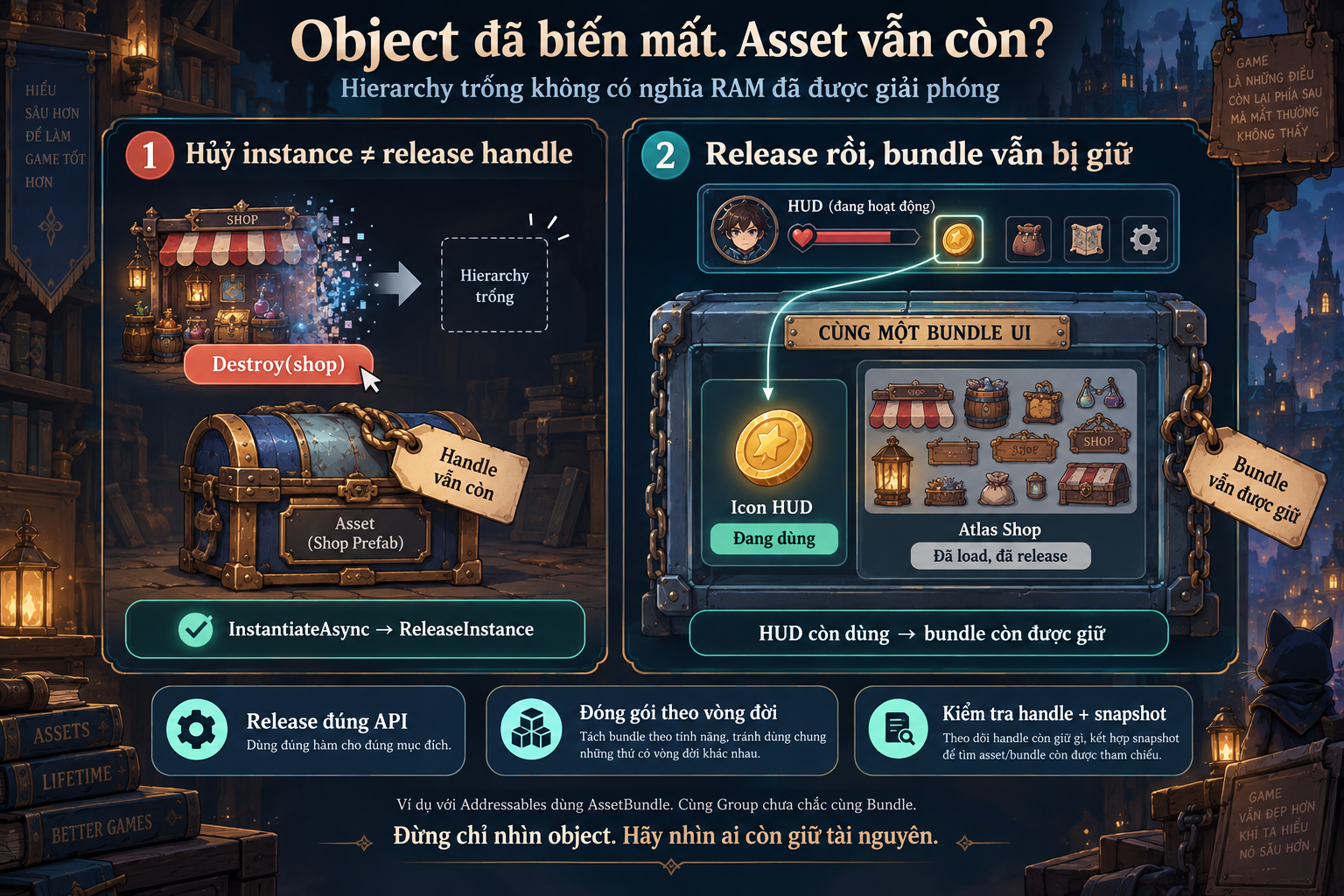 Open the Shop, close the Shop, call
 Destroy(). GameObject it disappears from the Hierarchy, but Memory Profiler still shows the Shop’s texture sitting there.
It is not necessarily a Unity leak. Maybe I only deleted the instance in the scene, while the asset usage rights have not yet been returned.
With Addressables AssetBundle, you need to look at both layers.
1. Destroying an object does not mean the asset has been released
Think of Addressables as keeping a “resource borrowing ledger.”
When you load or instantiate, the system records a usage entry. When you release, the corresponding usage is returned. This is the Addressables reference count, not the number of C# variables
pointing to the object. Addressables.InstantiateAsync() If you create it with Destroy()and then only call
, you have destroyed the instance but have not proactively released the operation that created it.
| How cleanup works depends on how it was created: | Creation method |
|---|---|
InstantiateAsyncRelease method trackHandle=true | Addressables.ReleaseInstance(gameObject) |
InstantiateAsync, default trackHandle=false | , set ReleaseInstance(handle) |
LoadAssetAsync Keep the handle and use Object.Instantiate | then Release(loadHandle) |
Destroy the clones; only after that Choose the matching release method, and do not release the same usage twice. InstantiateAsync.
Unity — Unity has a mechanism to automatically release tracked instances whenunloading a scene , but assets loaded separately are not released automatically that way. Do not treat “changing scenes will surely clean things up” as a resource-management rule..
Unity — Unload assets RAM 2. Even if you release correctly,
it still may not go down
-
Suppose a bundle contains:
-
The coin icon on the HUD, used throughout the match.
The Shop atlas, which was loaded when the shop opened. Close the Shop and release everything related to the Shop. The atlas no longer has any usage, but the HUD still keeps the coin icon in.
Unity — Memory management
That is why a small icon can keep large, no-longer-needed resources alive. **But remember:**same Group does not necessarily mean same Bundle Bundle Mode. Packaging also depends on Pack Together , such as Pack Separatelyor . Check the Build Layout instead of guessing from the Group name..
Unity — Group settings
A sensible split is by lifecycle: if the HUD is used for a long time and the Shop is short-lived, consider separating bundles, and also check shared dependencies.
-
If you use a pool, who is responsible for holding the asset?
-
For bullets or continuously spawned enemies, one easy way to manage it is:
LoadAssetAsyncThe pool manager calls -
once and keeps the handle.
Object.InstantiateCreate the clones with -
, then take/return them to the pool.
When discarding the pool, clean up all clones first and only then release the handle. Object.Instantiate Clones created with do not automatically increase Addressables’ reference count. Therefore, the manager must keep the handle for as long as the clones are using the asset —.
including the ones that are inactive in the pool Releasing too early can cause dependencies to be unloaded while clones still exist..
Unity — Loading and instantiating assets RAM The pool helps reuse objects; in return, the resources are kept in
as long as the pool still needs them.
- Measure the right place, don’t just look at the Hierarchy
-
I will check two things: Addressables Profiler:
-
which handle is still holding the asset, which bundle still has dependencies. Memory Profiler:
whether the suspicious texture, mesh, or object is actually still in the snapshot. Released In Addressables Profiler, the state Assets not loaded means there is no active handle left, but the content may still be in memory. The option RAM. only shows assets that belong to a bundle that is loaded but not actively loaded; you cannot look at that list and conclude that everything is consuming.
Unity — Profiler module RAM Finally,
the process total not dropping immediately is still not enough to conclude a leak. First, you must determine whether the asset is still alive, the bundle is still being held, or the memory has been freed but the allocator is keeping it for reuse.