The Complete VContainer

Minh Khoa
Author
**Article objective:**Detailed guide to using VContainer - DI The fastest and most modern framework for Unity. This article provides knowledge from foundational concepts to real-world project architecture.
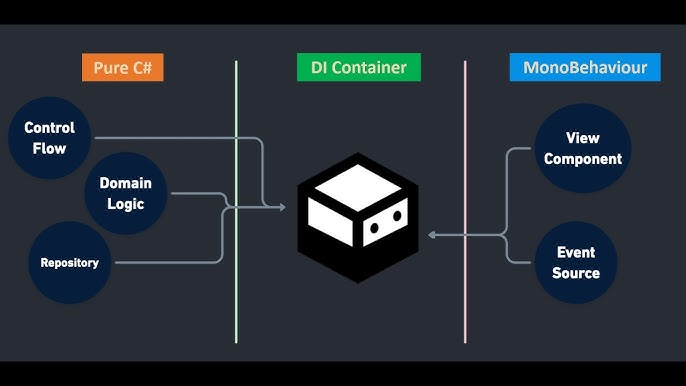 ## 🌟 PART 1 — WHY VCONTAINER?
In the Unity ecosystem,Zenjectwas once the king of Dependency Injection (DI). But Zenject is quite heavy, has initialization overhead, generates Garbage Collection (GC) and an outdated codebase.
VContainerwas created to solve those problems:
- **Blazing fast:**Initialization (Resolution) is almost O structure(1) and extremely optimized, many times faster than Zenject.
- **Zero Allocation:**Resolving objects (after initialization) does not generate garbage (Zero GC Alloc). It supports smooth gameplay without worrying about stutter or lag.
- **Pure C# and lightweight:**No complex magic. API friendly design, easy to read, easy to understand.
- **Unity Lifecycle integration:**Provides a "Plain C# class" (without inheritance MonoBehaviour) but still usable
Awake,Start,Update.
🏗️ PART 2 — CORE CONCEPTS
To master VContainer, you need to understand 3 main components:
1. LifetimeScope (Composition Root)
This is the "container" (Container). All objects and services will be declared here. It inheritsMonoBehaviourand is attached to a GameObject in Scene (or Project).
2. Builder (Registration / Registration)
This is the tool used inLifetimeScopeto tell the system:"I have Service A, when anyone needs Interface B, give them Service A."
3. Lifetime (Object lifetime)
When VContainer creates an Object for you, how long does that Object live?
- Lifetime.SingletonOnly 1 instance is created. Whoever calls it gets back exactly this instance.
- Lifetime.TransientEvery time someone asks (resolve), it creates a
new Object()brand new. - Lifetime.ScopedWorks like Singleton, but limited to a
LifetimeScopespecific. (Often used with Child Scopes).
🛠️ PART 3 — BASIC USAGE (STEP-BY-STEP)
**Problem:**We have aAudioServiceand aPlayerControllerthat needs to use it.
B1Write an independent class (No need MonoBehaviour)
csharp

public class AudioService
{
		public void Play(stringsfxName)=>Debug.Log($"Playing:{sfxName}");
}

public class PlayerController
{
		private readonly AudioService_audio;

		 // VContainer sẽ tự động "nhét" (inject) AudioService vào đây
		public PlayerController(AudioService audio)
		{
			_audio =audio;
		}

		publicvoidJump()
		{
			_audio.Play("jump_sound");
		}
}
B2Connect them with LifetimeScopeCreate a scriptGameLifetimeScope.csand attach it to an empty GameObject in the scene.
csharp

usingVContainer;
usingVContainer.Unity;

public class GameLifetimeScope :LifetimeScope
{
		protected override void Configure(IContainerBuilder builder)
    {
        // Đăng ký AudioService là Singleton
				builder.Register<AudioService>(Lifetime.Singleton);

        // Đăng ký PlayerController. Nhưng vì nó không nằm trong scene,
        // nếu đăng ký thường sẽ không ai gọi nó chạy.
        // VContainer có EntryPoint để tự động chạy.
				builder.RegisterEntryPoint<PlayerController>();
    }
}
🌀 PART 4 — ENTRY POINT & UNITY LIFECYCLE (REPLACING MONOBEHAVIOUR)
One of VContainer's strongest features is separating Logic from MonoBehaviourInstead of the functionStart(), Update()we use Interfaces.
csharp

usingVContainer;
usingVContainer.Unity;

public class EnemyManager :IInitializable,IStartable,ITickable,IDisposable
{
    // Chạy tương tự Awake()
public void Initialize() {Debug.Log("Init"); }

    // Chạy tương tự Start()
public void Start() {Debug.Log("Start"); }

    // Chạy tương tự Update()
public void Tick() {Debug.Log("Update..."); }

    // Chạy tương tự OnDestroy()
public void Dispose() {Debug.Log("Clean up"); }
}
Register this class:
csharp

// Đăng ký như một EntryPoint (Gắn nó vào vòng lặp game của Unity)
builder.RegisterEntryPoint<EnemyManager>();
🔌 PART 5 — TYPES OF INJECTION AND REGISTRATION TYPES (REGISTRATION)
1. How to Inject (Dependency injection)
**A. Constructor Injection (🎯 Recommended 100%)**Ensures the object is always in a complete state when it is created.
csharp

public class ShopLogic {
	public ShopLogic(CurrencyService currency) { ... }
}
**B. Method Injection (Use for MonoBehaviour)**Because MonoBehaviour is created by Unity (cannot be done through the Constructor)so we use the property[Inject].
csharp

public class UIHealthBar :MonoBehaviour
{
private HealthSystem _health;

    [Inject]// Hàm này sẽ tự động chạy ngay sau khi Awake() xong
		public void Construct(HealthSystem health)
    {
			_health =health;
    }
}
2. Advanced Registration Types
Register Interface (AsImplementedInterfaces)
csharp

// Bất cứ ai cần ILogger, sẽ nhận được UnityLogger
builder.Register<UnityLogger>(Lifetime.Singleton).AsImplementedInterfaces();
// Hoặc ngắn gọn:
builder.Register<UnityLogger>(Lifetime.Singleton).As<ILogger>();
Register MonoBehaviour available in the Scene
csharp

// Kéo thả component từ Inspector vào LifetimeScope, rồi đăng ký
[SerializeField]private Camera _mainCamera;
// ... trong Register
builder.RegisterComponent(_mainCamera);
Inject multiple Implementations (IEnumerable)
csharp

builder.Register<KeyboardInput>(Lifetime.Singleton).As<IInputProvider>();
builder.Register<GamepadInput>(Lifetime.Singleton).As<IInputProvider>();

// Tiêu thụ
public class PlayerMovement
{
    // Lấy hết các loại input provider
		public PlayerMovement(IEnumerable<IInputProvider>inputs) { ... }
}
🏭 PART 6 — FACTORY PATTERN AND PRACTICAL PREFAB SPAWNING
This is the part that confuses many people the most:"How do you spawn Enemy/Bullet when entering the game and Enemy/Bullet it can also be Injected?"
Method 1: Inject IObjectResolver into the Spawn Component
csharp

usingVContainer;
usingVContainer.Unity;

public class EnemySpawner :MonoBehaviour
{
    // IObjectResolver là cốt lõi của VContainer, dùng để "đẻ" ra object
    [Inject]private readonly IObjectResolver _resolver;
		public GameObject enemyPrefab;

		public void Spawn()
    {
        // Unity Instantiate bình thường sẽ không Inject được.
        // Phải dùng Instantiate của VContainer
				varenemy =_resolver.Instantiate(enemyPrefab);
    }
}
Method 2: Use Func (Factory Delegate) Pure C# (BETTER)
Don't make your logic class depend onIObjectResolver.
In LifetimeScope:
csharp

public Enemy Prefab;
...
// Đăng ký một Factory (một hàm trả về Enemy)
builder.RegisterFactory<Enemy>(resolver=>
	{
			return ()=>resolver.Instantiate(Prefab);
	},Lifetime.Scoped);
In the Spawner class:
csharp

public class WaveController
{
		private readonly Func<Enemy> _enemyFactory;

    // Inject ra cái máy ép (factory), chứ không tiêm sẵn Enemy
		public WaveController(Func<Enemy>enemyFactory)
    {
		_enemyFactory =enemyFactory;
    }

		public void SpawnWave()
    {
		Enemy newEnemy =_enemyFactory();// Chạy delegate sẽ Instatiate và Inject Enemy
    }
}
🌳 PART 7 — SCOPE STRUCTURE & PRACTICAL LARGE-PROJECT APPLICATION (HIERARCHICAL)
A large game cannot be crammed into 1LifetimeScope. We will organize it as a tree:ProjectScope -> SceneScope -> ChildScope
1. ProjectScope (Global Scope)
Automatically initialized when the game runs, exists forever (DontDestroyOnLoad).
- Contains: SaveSystem, NetworkManager, AudioSystem, UserProfile.
- **How to create:**Create a prefab
ProjectLifetimeScope. InProject Settings -> VContainer -> Parentand assign it as the Root.
2. SceneScope
- Located in the scenes (e.g.: MainMenu, GamePlay). These Scopes automatically receiveProjectScope as Parent.
- Contains: EnemyManagerUIManager of the Scene, LevelController.
- **Benefits:**The Service of SceneScope can be shared with the Service of ProjectScope (Example MenuController use AudioSystem of the Parent). But the Parent cannot access the child.
3. SubScope (Create dynamic Scope)
Example: Spawn a tank. The tank is so complex that it needs its own separate Container (TurretController, TrackController, Health).
csharp

varchildScope =_resolver.CreateScope(builder=>
{
builder.Register<TurretController>(Lifetime.Scoped);
    // ...
});

// Resolve thử từ Child Scope
varturret =childScope.Resolve<TurretController>();
// Xong việc thì tiêu hủy scope
childScope.Dispose();
⛔ PART 8 — ANTI-PATTERNS (MISTAKES TO AVOID WITH VCONTAINER)
Avoid the following mistakes so the codebase doesn't become "rotten" (code smell):
1. Disguised Service Locator Pattern
csharp

// ❌ XẤU: Truyền toàn bộ VContainer vào Object (Thế này thì dùng DI làm gì?)
public class Player {
public Player(IObjectResolver resolver) {
varaudio =resolver.Resolve<AudioService>();
    }
}

// ✅ TỐT: Chân thật và Rõ ràng về cái gì mình cần
public class Player {
public Player(AudioService audio) { ... }
}
2. Blindly Injecting into Data Classes
Never inject a service into Model/Data Class (Data transfer objects, JSON structures...). Dependency Injection (DI) is only used forServices / Logic / Controllers. Data should be "dumb" (dumb data).
3. Dependency Loops (Circular Dependency)
csharp

// Lỗi này sẽ sập game lúc chạy:
public ServiceA(ServiceB b) { }
public ServiceB(ServiceA a) { }
// Cách sửa: Rút Interface ra, hoặc quy hoạch lại luồng dữ liệu, sử dụng Event
//Message Broker thay cho Dependency trực tiếp.