Updating the game without resetting players: Migrating Save Data in Unity

Minh Khoa
Author
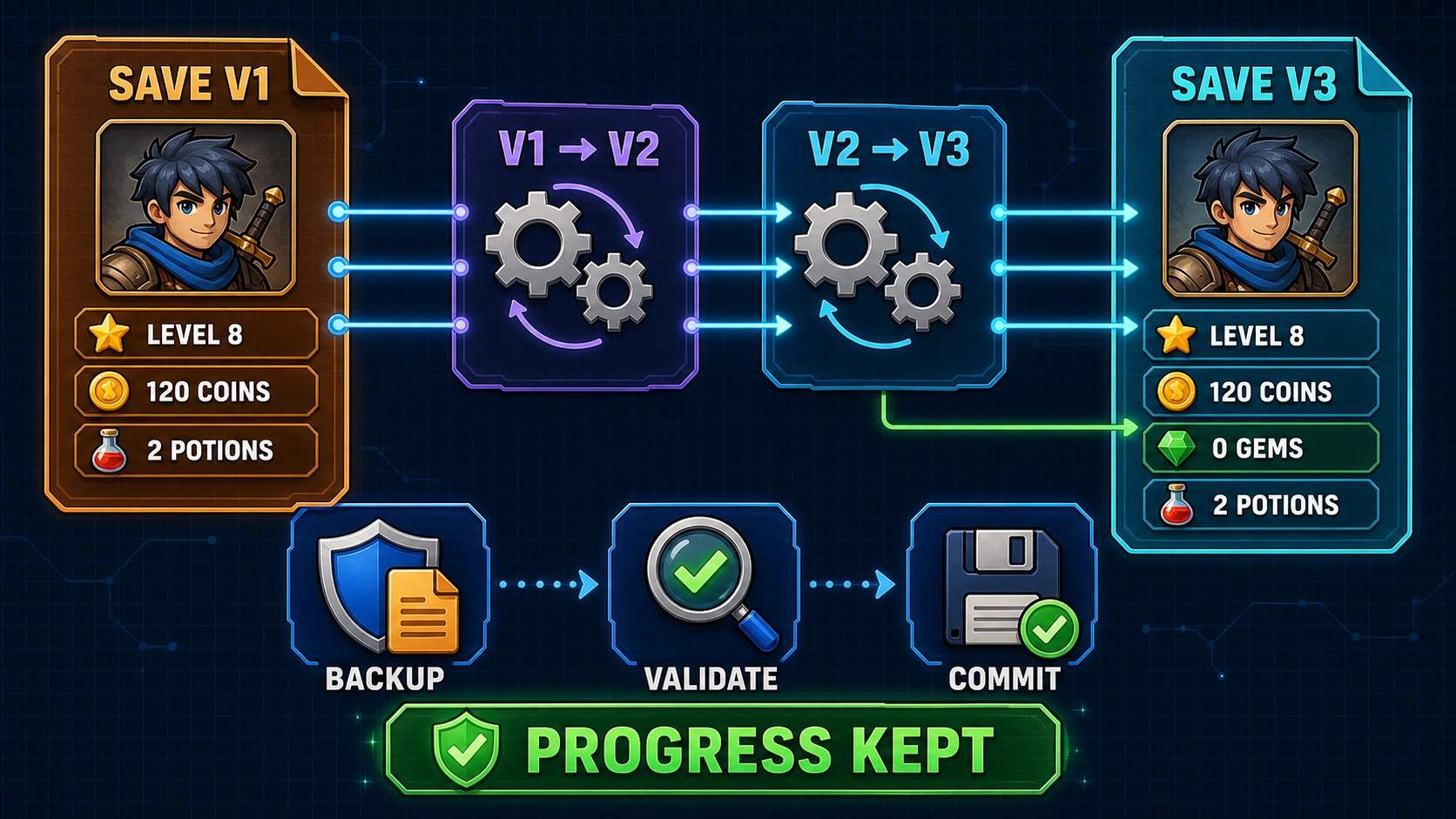 Suppose the first version of the game saves data like this:
{
  "schemaVersion": 1,
  "level": 8,
  "coins": 120,
  "items": ["potion", "potion"]
}
After a few updates, the current version has:
- Added
gems. - Changed
leveltohighestUnlockedLevel. - Combined Coins and Gems into
Wallet. - Changed Inventory from a list of IDs into
ItemStack.
Old saves don’t have these data. So how do you update without losing the player’s progress?
Is adding only new fields enough?
In Unity 6 today, JsonUtility.FromJson field initializers and constructors will run first, then fields present in JSONare overwritten. Missing fields will keep the default values you initialized. FromJsonOverwrite also keeps the object’s fields unchanged if JSON does not contain that field.
For example:
[Serializable]
public class SaveData
{
    public int level;
    public int coins;

    // Save cũ không có field này
    public int stamina = 100;
}
Old saves can receive stamina = 100.
This approach is fine if the only change is adding a simple field. But it does not solve cases like:
- Renaming a field.
- Splitting or merging data.
- Changing a data type.
- Changing item IDs.
- Changing the meaning of a value.
To handle this safely, saves need their own version.
Do not use the game version as the save version
You should store a field:
public int schemaVersion;
schemaVersion describes the save structure version, not the game version.
The game can update from 1.2.0 to 1.2.1 but the save does not change. Conversely, even a single update can migrate a save through multiple structures.
Game Version:   1.0 → 1.1 → 1.2 → 2.0
Save Version:    V1 ──────→ V2 ──→ V3
Migrate by version
Suppose the current save is V3. The player can still bring save V1 straight to the new version.
Instead of writing one large function V1ToV3I should run it sequentially:
V1 → V2 → V3
Each step is only responsible for one specific change.
V1 → V2
- Change
leveltohighestUnlockedLevel. - Add
gems. - Keep Coins and Inventory unchanged.
[Serializable]
public class SaveV1
{
    public int schemaVersion;
    public int level;
    public int coins;
    public string[] items;
}

[Serializable]
public class SaveV2
{
    public int schemaVersion;
    public int highestUnlockedLevel;
    public int coins;
    public int gems;
    public string[] items;
}
Migration:
public string MigrateV1ToV2(string json)
{
    SaveV1 oldSave = JsonUtility.FromJson<SaveV1>(json);

    var newSave = new SaveV2
    {
        schemaVersion = 2,

        // Bảo toàn progress
        highestUnlockedLevel = oldSave.level,
        coins = oldSave.coins,
        items = oldSave.items ?? new string[0],

        // Dữ liệu mới
        gems = 0
    };

    return JsonUtility.ToJson(newSave);
}
V2 → V3
At V3Currency is combined into Wallet:
{
  "schemaVersion": 3,
  "highestUnlockedLevel": 8,
  "wallet": {
    "coins": 120,
    "gems": 0
  },
  "inventory": [
    {
      "id": "potion",
      "amount": 2
    }
  ]
}
Migration V2 → V3 will:
- Copy Coins and Gems into
Wallet. - Keep Level unchanged.
- Combine the two
"potion"into oneItemStackwithamount = 2.
No progress data is recalculated arbitrarily.
Organize migrations into a pipeline
You can define each migration like this:
public interface ISaveMigration
{
    int FromVersion { get; }
    int ToVersion { get; }

    string Apply(string json);
}
The Migration Manager reads the version and runs each step:
while (version < CurrentSaveVersion)
{
    ISaveMigration migration =
        FindMigrationFrom(version);

    json = migration.Apply(json);

    int nextVersion = ReadVersion(json);

    if (nextVersion != migration.ToVersion)
        throw new InvalidDataException(
            "Migration không cập nhật đúng version."
        );

    version = nextVersion;
}
Result:
Save V1 → chạy V1→V2 và V2→V3
Save V2 → chỉ chạy V2→V3
Save V3 → load bình thường
Read the version before creating default data
This is a fairly subtle trap.
Suppose I create a default object:
var data = new SaveData
{
    schemaVersion = 3
};

JsonUtility.FromJsonOverwrite(json, data);
If the save is very old and does not have schemaVersionthis field will still keep the value 3The game will mistakenly treat the old save as the current save and skip migration.
Read the version using a separate header, without assigning a default value:
[Serializable]
public class SaveHeader
{
    public int schemaVersion;
}

int ReadVersion(string json)
{
    SaveHeader header =
        JsonUtility.FromJson<SaveHeader>(json);

    return header?.schemaVersion ?? 0;
}
If the first saves did not have a version, I can define:
schemaVersion = 0 → Legacy Save
Then write a separate migration for V0.
Do not overwrite the original save immediately
The safe flow should be:
Đọc save gốc
    ↓
Migrate trong memory
    ↓
Validate kết quả
    ↓
Ghi ra save.tmp
    ↓
Đọc lại save.tmp để kiểm tra
    ↓
Backup save cũ
    ↓
Thay thế save chính
If migration fails at any step, the original file is still intact.
The save should be placed in Application.persistentDataPath. Unity keeps this path across application updates if the Bundle Identifier does not change.
On supported platforms, .NET has File.Replace to replace the file and create a backup:
File.WriteAllText(tempPath, migratedJson);

// Đọc lại và validate temp trước
Validate(File.ReadAllText(tempPath));

File.Replace(
    tempPath,
    savePath,
    backupPath
);
You need to test file replacement on each platform. If the platform does not support it, you must have a separate file-writing and recovery strategy.
Absolutely avoid:
catch
{
    return new SaveData();
}
A small migration bug here will turn into a completely blank save.
What should be validated?
After migration, you should check:
schemaVersionhas become the current version.- Level or Checkpoint still exists.
- Coins and Gems have not changed beyond what was intended.
- Inventory has no empty ID.
- Valid item count.
- The old IDs have been mapped to new IDs.
For example:
fire_sword_old → fire_sword
If you encounter an item that no longer exists, do not silently delete it. You can:
- Map to a replacement ID.
- Refund the Currency.
- Keep it in the list
unresolvedItems. - Log it for later handling.
The goal of migration is to protect player assets, not just to make JSON deserialize succeed.
The cases to test
| Input save | Expected result |
|---|---|
| Actual V1 save | Run V1 → V2 → V3, keep progress unchanged |
| Save V2 | Only run V2 → V3 |
| Save V3 | No migration |
| Save without a version | Run migration for Legacy Save |
| JSON corrupted | Do not overwrite the original file |
| Higher version than the game | Require a game update, do not downgrade automatically |
| Game shuts down while writing | Can be restored from backup |
| Migration runs again | Do not duplicate Coins or Items |
You should keep a few real save files from each version in the project and run them through automated tests after every save-system change.
In summary
Save migration is not just loading an old file and filling in the fields that are null.
It is a controlled pipeline:
Đọc version
→ Migrate tuần tự
→ Validate progress
→ Ghi file tạm
→ Backup
→ Commit
The most important principle:
If migration fails, it is better to keep the old, unreadable save unchanged than to overwrite it with a brand-new blank save.