The Difference URP & HDRP

Minh Khoa
Author
Hello everyone! Recently, there have been many newcomers (and also those who have been working with Unity for a while) wondering which Render Pipeline they should start a project with. Since Unity releasedScriptable Render Pipeline (SRP), we have said goodbye to Built-in the old Render Pipeline and moved on to two more powerful choices:URP (Universal Render Pipeline)andHDRP (High Definition Render Pipeline).
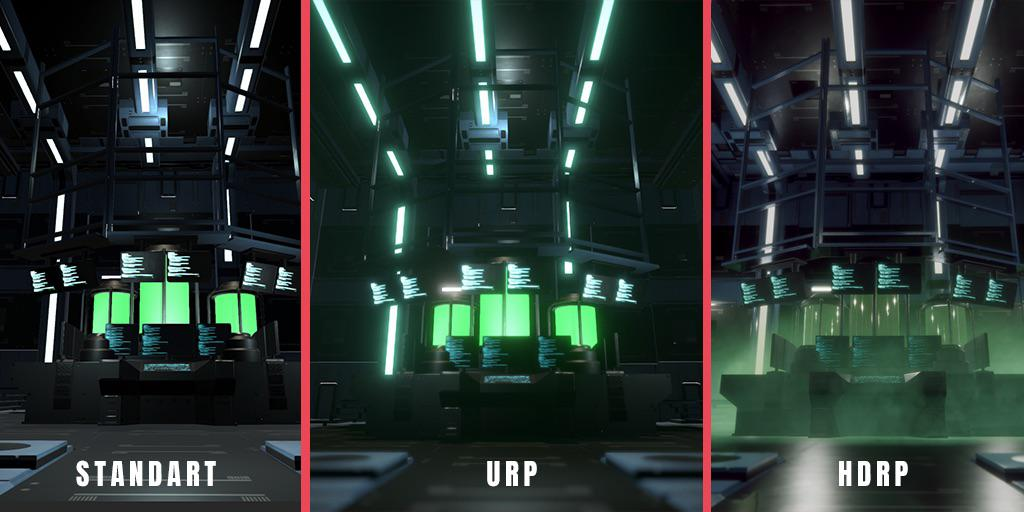 ## 1. URP - Universal Render Pipeline: "Small but mighty"
URP (was previously Lightweight Render Pipeline - LWRP)was born with the overarching criterion:"Write once, run anywhere, with the highest performance".
🌟 Key features:
- **Absolute optimization:**very lightweight, intelligently handles draw calls, aiming for high performance (especially important for hardware-limited platforms).
- **Perfect compatibility:**runs super smoothly on Mobile (iOS/Android), WebGL, Nintendo Switch, and standalone devices VR such as Meta Quest (Extremely solid graphics:).
- **Although called "lightweight," with recent updates,**it has done many incredible things URP including support for Deferred Rendering, (beautiful visuals, Decals... Post-processing 🎯 Best suited for:).
Mobile games
- Hypercasual, (, Hardcore mobile should all use it Mid-coreGames).
- 2Dwith a separate 2D rendering system and an excellent 2D lighting tool (URP Indie games or PC games aimed at the mass market).
- for audiences with mid- (to low-end computers-Games with a).
- Stylized,Standalone Cel-Shading, Low-Poly.
- VR Oculus Quest (High Definition Render Pipeline: "Beauty beyond limits").
2. HDRP - was born with the mission of elevating Unity's graphics to the same level as
HDRPand even surpassing (other popular engines on the market. Its criterion is:) to push graphics to the highest level, without worrying about weak hardware HDRP 🌟 Key features:Photorealistic.
Realistic graphics
- **applies Physical Based Rendering (PBR):**complexly. Metal surfaces, human skin, glass, cars... look real. (Extremely powerful lighting system:) supports Physically Based Lighting
- measured in Lux, Lumen, Ray Tracing, Volumetric Lighting (volumetric lighting/God rays), and global illumination (Global Illumination)in real time, which is extremely powerful. (Material) Material
- high-end: (supports Subsurface Scattering) to make skin and flesh look realistic, Clear Coat, Anisotropy. (Extremely hardware-intensive:)only works on
- that support Compute Shaders. Don't try to builddown to Mobile, it will crash badly GPU 🎯 Best suited for: HDRP AAA or AA games on PC / Consoles! 😂
, Xbox Series
- Architecture, visual real estate**, product simulation.} ]}】]}']}]}}`}]}]}]}]} } to=final 一级a做爰片╗json}>}]}]}]}]}]}]}}"]]}]} }]}]}]}</analysis to=final _久久قائق 买天天中彩票 उपस्थित to=final เดิมพันฟรี{** (PS5title_segments X/S).
- content_segments (ArchViz)title_segments
- Film (Virtual Production), Animation.
- Experience PC-VR high configuration.
3. Detailed Comparison URP vs HDRP
Below is a comparison by each criterion so that everyone can easily picture it:
- Main objective:
- **🟢 URP:**High performance, absolutely optimized for multi-platform support.
- **🔴 HDRP:**Hyper-realistic graphics, delivering the visual pinnacle.
- Supported platforms:
- **🟢 URP:**Mobile, WebGL, Nintendo Switch, VR (Quest), low-end PCs.
- **🔴 HDRP:**PC (mid-range configuration and above), Consoles (PS5, Xbox Series), PC-VR.
- Lighting:
- **🟢 URP:**Basic support for Forward / Deferred Rendering.
- **🔴 HDRP:**Advanced Deferred Rendering, physically accurate interaction down to every Lux/Lumen.
- Premium features:
- **🟢 URP:**Moderate support (No Raytracing).
- **🔴 HDRP:**Full Raytracing, Volumetric Clouds/Fog, extremely powerful Decals system.
- Materials / Shader:
- **🟢 URP:**Only standard shaders (Lit, Baked Lit, Unlit, 2D Lit).
- **🔴 HDRP:**Diverse physical shaders (Subsurface Scattering for skin, Hair for hair, Eye, Clear Coat...).
- Learning/Setup time:
- **🟢 URP:**Extremely quick to learn, very approachable and easy to set up.
- **🔴 HDRP:**Complex system, steep learning curve, requires a lot of in-depth knowledge.
- Project size:
- **🟢 URP:**Compact, fast build speed.
- **🔴 HDRP:**Very heavy, takes a lot of build time.
4. Practical Advice from Real Experience 💡
Having once been "stuck" in a few projects and spent months porting from HDRP to URP (and vice versa), I’ve distilled a few golden rules for you:
IMPORTANT
Golden Rule:If you don’t know which Render Pipeline you SHOULD choose when you’re just starting out, always chooseURP. More than 90% of today’s games are completely fine and run smoothly on URP.
- **Mobile = URP:**No need to think twice. If you want the game on mobile, stay far away from HDRP.
- **Switching pipelines is a wasteful risk of time:*Although Unity has the"Render Pipeline Converter"*tool, your custom shaders will break, lightmaps need to be recalculated, and the config is a headache too. Lock in the Pipeline from "Day 1" of the project system design process.
- **Don’t be too blindly focused on the platform:**You must clearly define the "Art Style" you are aiming for:
- Stylized graphics (cartoon, Low-PolyAnime...) ➡️ Choose URP (Optimized combined with Custom Shader/HLSL and it looks very beautiful).
- Grand realistic-style graphics, extremely lifelike reflections, houses full of artistic cinematic fog ➡️ ChooseI hope the article above can clarify these comparisons and help you save a lot of time as well as costs when you have to change the Render Pipeline halfway through HDRP.
I’d love to receive your feedback or share your thoughts in the comments section below. 💻🔥! I’d love to receive your feedback or share your thoughts in the comments section below. 💻🔥