Onshore and Offshore Growing Together: How Can Subscribers Not Miss Events?

Minh Khoa
Author
Summary:
Subscribe()only receives events from that point onward. If no module is allowed to miss required data, the system must have a clear delivery contract: wait for all modules to subscribe, replay the latest state, or keep history for replay.
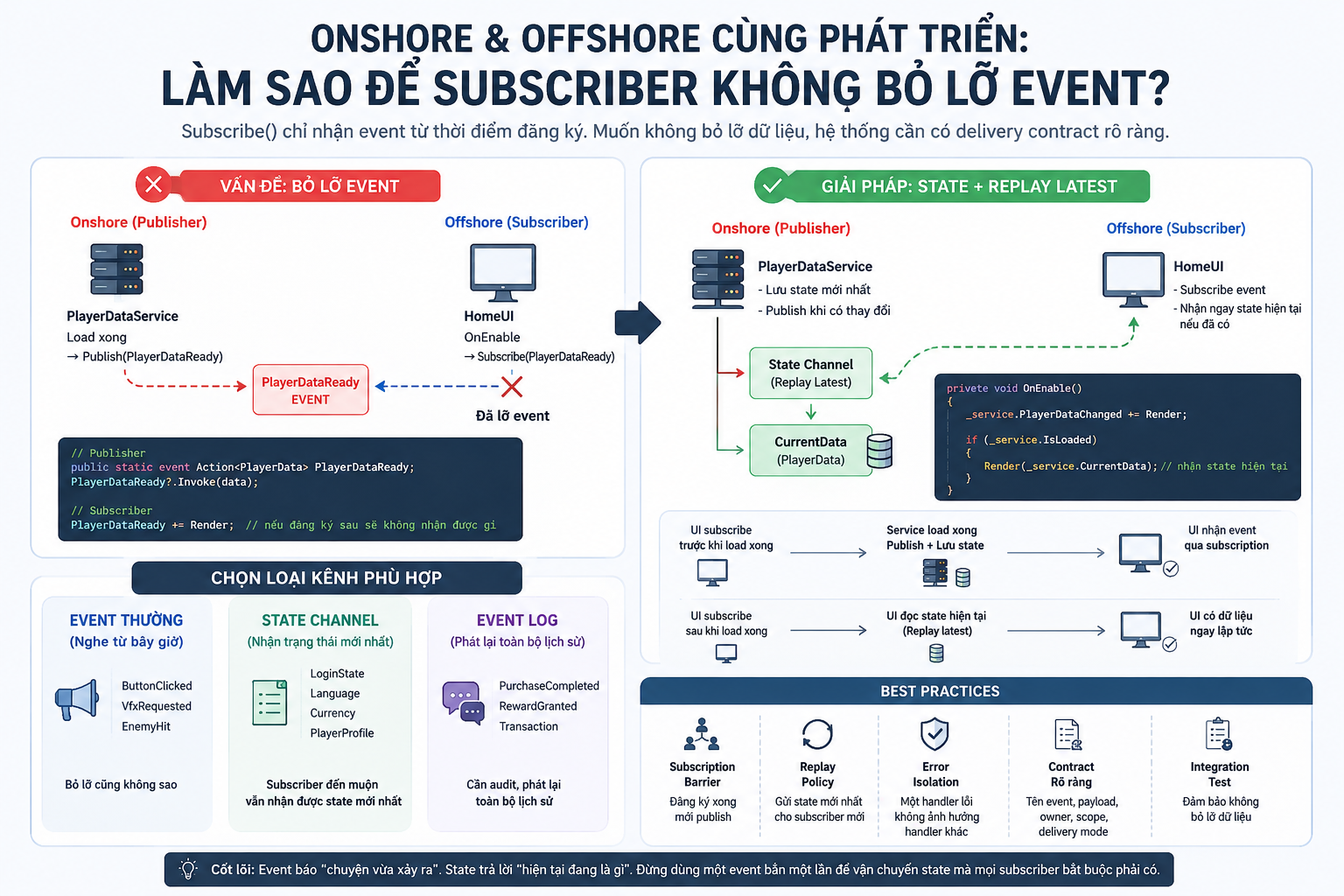 Suppose the onshore team handles
 PlayerDataService and the offshore team handles HomeUI:
PlayerDataService load xong → Publish(PlayerDataReady)
HomeUI OnEnable              → Subscribe(PlayerDataReady)
If the line above runs before the line below, UI will not receive anything. No crash, no compile error — just a blank screen on some devices.
This is not a case of “which team coded it wrong.” This is a bug in the semantics of the event design.
📢 1. Subscribe Is Not a Time Machine
A normal C# event is like a broadcast speaker: whoever is listening when the announcement is played receives it; those who arrive later do not hear it again.
If you want late listeners to still get the data, you need to choose the right kind of channel:
- Normal event — listen from now on:
ButtonClicked,VfxRequested,EnemyHit. - State channel — receive the latest state:
LoginState,Language,Currency,PlayerProfile. - Event log — replay the full history:
PurchaseCompleted,RewardGranted, transactions that need auditing.
Everyday example:
Event thường  = loa phát thanh
State channel = bảng thông báo, đến muộn vẫn đọc được trạng thái mới nhất
Event log     = lịch sử chat, vào sau vẫn kéo lên xem toàn bộ
Important rule: Mandatory data for building the screen is state, and it should not exist only as an event that fires once.
🚧 2. Use a Subscription Barrier Instead of Praying in Awake
Unity does not guarantee the order of calls to the same lifecycle function across GameObject if you do not configure it explicitly. So “this module subscribes in Awake(), that module publishes in Awake()” can easily become a race condition.
A safer bootstrap flow:
1. Tạo shared services + EventHub
2. Tất cả module Register / Subscribe
3. Khởi tạo dữ liệu, load save, gọi API
4. Khi mọi module Ready → publish initial state / AppReady
The key point is that step 4 must not run before step 2.
Script Execution Order can help a Bootstrapper run early, but do not use it to line up dozens of scripts from two teams. Initialization order should live in the code of a Composition Root so that, at a glance, you can see who registers first and who is allowed to publish later.
🛡️ 3. A StateChannel That Is Simple but Safe Enough
The example below addresses four common issues: late subscribers, duplicate subscription, the list being modified while publishing, and one handler throwing an exception and blocking the handlers that follow.
using System;
using System.Collections.Generic;
using UnityEngine;

// Chỉ gọi Publish/Subscribe từ Unity main thread.
public sealed class StateChannel<T>
{
    private readonly List<Action<T>> _handlers = new();

    private T _latest = default(T);
    private bool _hasValue;

    public void Subscribe(Action<T> handler, bool replayLatest = true)
    {
        // Không cho cùng một callback đăng ký hai lần
        if (_handlers.Contains(handler))
            return;

        _handlers.Add(handler);

        // Subscriber đến muộn vẫn nhận state hiện tại
        if (replayLatest && _hasValue)
            InvokeSafely(handler, _latest);
    }

    public void Unsubscribe(Action<T> handler)
    {
        _handlers.Remove(handler);
    }

    public void Publish(T value)
    {
        _latest = value;
        _hasValue = true;

        // Snapshot để handler có thể subscribe/unsubscribe khi đang dispatch
        Action<T>[] snapshot = _handlers.ToArray();

        foreach (Action<T> handler in snapshot)
            InvokeSafely(handler, value);
    }

    private static void InvokeSafely(Action<T> handler, T value)
    {
        try
        {
            handler(value);
        }
        catch (Exception exception)
        {
            // Một module lỗi không được chặn các module còn lại
            Debug.LogException(exception);
        }
    }
}
The subscriber is used very simply:
private void OnEnable()
{
    _playerState.Subscribe(Render, replayLatest: true);
}

private void OnDisable()
{
    _playerState.Unsubscribe(Render);
}
Results:
- Subscribe after the data has loaded → receive
_latestimmediately. - Subscribe twice → the callback still appears in the list only once.
- One subscriber throws an exception → the subscriber after it is still called.
- Object disabled → clearly unsubscribe, with no garbage listeners left behind.
💡
ToArray()creates allocations, so this example is suitable for low-frequency state events. Events that run continuously every frame need a pooled snapshot or a more optimized dispatcher after profiling.
⚠️ 4. Why Is OnChanged?.Invoke(value) Not Enough?
A C# multicast delegate calls subscribers synchronously and in order. If a handler throws an exception and does not catch it itself, the handlers after it will not be called.
In a small team project, the rule “handlers must not throw” may be enough. But when onshore and offshore both plug modules into a shared bus, it is better to isolate errors per subscriber, as in InvokeSafely() above.
However, catching exceptions does not mean swallowing errors. Logging must capture:
Event nào?
Publisher nào?
Subscriber nào lỗi?
Payload / EventId là gì?
🤝 5. A Shared Contract Is More Important Than a Fancy EventBus
The two teams should have a common assembly/package, for example Game.Contracts, containing only:
- The event name and type.
- An immutable payload with a clear meaning.
- The event owner.
- Scope and lifetime.
- Delivery mode: future-only, latest-state or full-history.
- The thread allowed to publish.
- Versioning rules and backward compatibility.
For events with retries or related to money/rewards, the handler must be idempotent: receiving the same EventId twice must not grant the reward twice.
The minimum integration test suite should check:
- Publish first, then subscribe → the latest state is still replayed.
- One subscriber throws → the next subscriber still receives it.
- Subscribe twice → called only once.
- Unsubscribe → no longer receives the event.
- A module using the old contract version can still read the new payload.
🌐 What If Onshore and Offshore Are Two Different Processes?
If these are only two teams building into the same Unity Player, StateChannel/EventBus in memory is enough.
If the publisher and subscriber truly run in two services or on two machines, a C# event cannot guarantee delivery. In that case, you need a durable message broker or an event log with ack, retry, offset/checkpoint, and an idempotent consumer.
✅ Conclusion
There is no magical Subscribe() call that guarantees every module always receives all data.
To keep a multi-team system stable, you need all five layers of protection:
Contract rõ
+ Subscription Barrier
+ Replay Policy
+ Error Isolation
+ Integration Test
Bottom line: Events are for saying “this just happened.” State is for answering “what is it right now?” Do not use a one-time event to transport state that every subscriber must have.