Photon Quantum

Minh Khoa
Author
1. What is Photon Quantum?
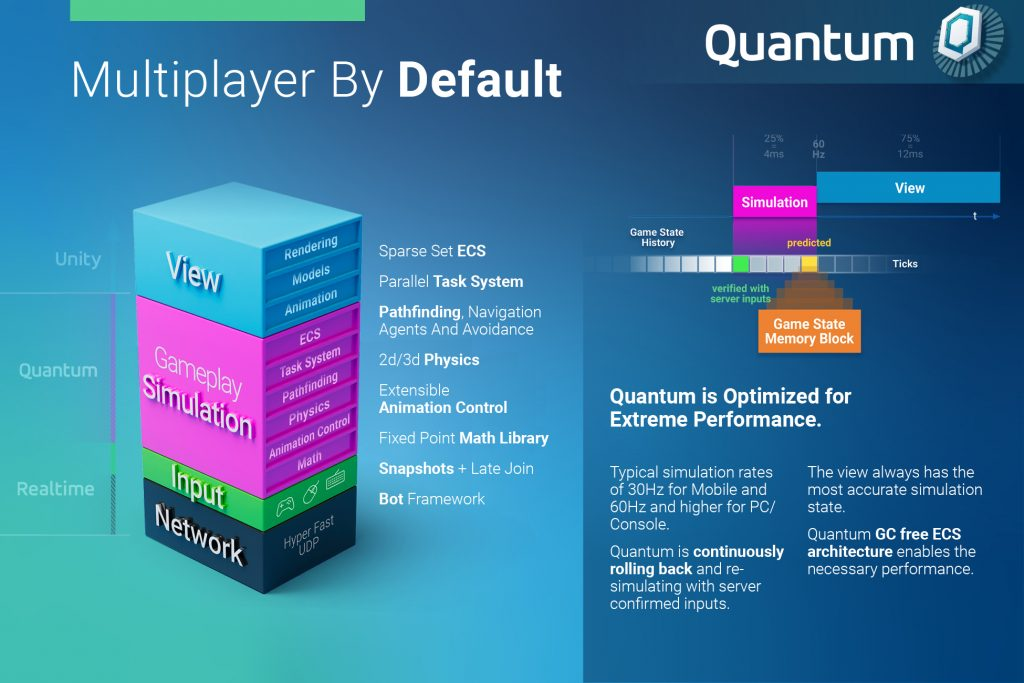 Photon Quantum is a deterministic multiplayer engine for Unity, built with an architecture ECS and predict/rollback networking. In short:
- Unity handles rendering, animation view, UIaudio, input device.
- Quantum handles simulation: game state, deterministic physics, rules, damage, spawn, win/lose.
- Networking does not sync each object's transform in the traditional way. Clients mainly exchange input; because the simulation is deterministic, the same input produces the same result.
If Fusion/PUN usually makes you think aboutNetworkObject, RPCstate replication, interpolation, authority, then Quantum makes you think like this: "The entire game is a tick-based simulation machine. All clients run the same machine. The server helps validate input and coordinate time."
Quantum is a good fit for games that need fast response and high fairness:
- Fighting games, sports, racing, arena action.
- Top-down shooters, brawlers, small MOBAs, realtime tactical games.
- Games physics/network that are complex and where you do not want to write rollback netcode yourself.
Quantum is not the first choice for idle/offline pure UI-heavy social apps, or simple multiplayer that only needs to sync a few variables.
2. Core idea: deterministic + rollback
In traditional multiplayer, client A says "I'm at position X," client B receives it and interpolates. Easy to understand, but easy to drift, easy to cheat, and physics sync is often painful.
In Quantum:
- Each client sends input per tick.
- Each client runs its own local simulation.
- If the actual input from the server differs from the predicted input, Quantum rolls back to an old frame and re-simulate.
- Because the simulation is deterministic, the result after re-simulate will be the same across clients.
This creates a feeling of less lag than classic lockstep because the client does not have to wait for all players before simulating the next frame. The tradeoff is that gameplay code must be absolutely deterministic.
3. Mental model: Quantum is a small game engine inside Unity
Split your brain into 2 areas:
Quantum Simulation
This is the "truth" of gameplay:
- Entity, Component, System.
- Player input, command, event.
- Transform2D/3D deterministic.
- Physics 2D/3D deterministic, KCC, navigation.
- Fixed-point math:
FP,FPVector2,FPVector3. - Not dependent on
MonoBehaviour,GameObject,Time.time,UnityEngine.RandomUnity's float physics.
Unity View
This is the presentation layer:
- Model, sprite, animator, particle, sound.
- UI health bar, floating text, camera.
- Input polling from keyboard/gamepad/mobile.
- Subscribe to events from Quantum to trigger VFX/SFX.
- Read state from Quantum to display it.
Golden rule: Quantum decides what happens; Unity only makes it look better.
4. Basic project structure
After installing Quantum 3, the project usually has:
Assets/
  Photon/          # SDK Photon/Quantum, thường không sửa trực tiếp
  QuantumUser/     # code của game
    Simulation/    # logic deterministic, .qtn, systems
    View/          # Unity-side scripts: input, UI, view glue
    Resources/     # config, assets runtime
When upgrading SDK, Assets/Photonmay be replaced. Game code should live inAssets/QuantumUser.
5. ECS inside Quantum
Quantum uses Entity Component System:
- Entity: the ID of an object in the simulation.
- Component: plain data, for example
Health,PlayerLink,Weapon,Inventory. - System: logic that runs every tick, for example
MovementSystem,CombatSystem. - Frame: a snapshot of the current game state. Every simulation read/write goes through
Frame.
Example component:
component Health {
  FP Current;
  FP Max;
}

component PlayerLink {
  player_ref PlayerRef;
}
Example system:
namespace Quantum {
  using Photon.Deterministic;
  using UnityEngine.Scripting;

  [Preserve]
  public unsafe class RegenSystem : SystemMainThreadFilter<RegenSystem.Filter> {
    public struct Filter {
      public EntityRef Entity;
      public Health* Health;
    }

    public override void Update(Frame frame, ref Filter filter) {
      filter.Health->Current = FPMath.Min(
        filter.Health->Max,
        filter.Health->Current + FP._1 * frame.DeltaTime
      );
    }
  }
}
[Preserve]important so Unity stripping does not remove the system.
6. DSL .qtn: where the game state is declared
Quantum uses its own DSL, usually stored in the file.qtnto declare deterministic data. From there, Quantum generates C#.
You can declare:
componentstructinputsignaleventassetenum,flags,union- dynamic collections such as
list<T>,dictionary<K,V>,hash_set<T>
Example of a filePlayer.qtn:
input {
  FPVector2 Move;
  button Dash;
  button Attack;
}

component PlayerLink {
  player_ref PlayerRef;
}

component Fighter {
  FP MoveSpeed;
  FP DashCooldown;
  FP AttackCooldown;
}

event PlayerAttacked {
  entity_ref Attacker;
  FPVector2 Position;
}

signal OnDamage(FP amount, entity_ref target);
The important point: the game state in Quantum needs blittable/deterministic. Do not put C#objects, Unity references,GameObject, Transform, DateTime, floatinto the simulation.
7. Input: the thing sent every tick
Input is small, repeatedly sent data. Used for realtime actions:
- Move direction.
- Jump/dash/fire button.
- Aim direction.
- The skill slot being held.
Input definition:
input {
  FPVector2 Move;
  button Fire;
}
Unity polls the input and sends it to Quantum:
using Photon.Deterministic;
using Quantum;
using UnityEngine;

public class LocalQuantumInput : MonoBehaviour {
  private void OnEnable() {
    QuantumCallback.Subscribe(this, (CallbackPollInput callback) => PollInput(callback));
  }

  private void PollInput(CallbackPollInput callback) {
    var input = new Quantum.Input();

    var move = new Vector2(
      UnityEngine.Input.GetAxisRaw("Horizontal"),
      UnityEngine.Input.GetAxisRaw("Vertical")
    );

    input.Move = move.normalized.ToFPVector2();
    input.Fire = UnityEngine.Input.GetKey(KeyCode.Space);

    callback.SetInput(input, DeterministicInputFlags.Repeatable);
  }
}
With “, poll the current state using ”buttonFor , poll the current state with , do not use “,GetKey.” Quantum computes 自 in the simulation according to the tick.GetKeyDown/GetKeyUpIn the simulation:WasPressed, IsDown, WasReleasedOptimize input: keep the input as small as possible. For example, many games encode direction from ”
” to ”
namespace Quantum {
  using Photon.Deterministic;
  using UnityEngine.Scripting;

  [Preserve]
  public unsafe class PlayerMoveSystem : SystemMainThreadFilter<PlayerMoveSystem.Filter> {
    public struct Filter {
      public EntityRef Entity;
      public Transform2D* Transform;
      public PlayerLink* PlayerLink;
      public Fighter* Fighter;
    }

    public override void Update(Frame frame, ref Filter filter) {
      Input* input = frame.GetPlayerInput(filter.PlayerLink->PlayerRef);
      if (input == null) {
        return;
      }

      filter.Transform->Position +=
        input->Move * filter.Fighter->MoveSpeed * frame.DeltaTime;

      if (input->Fire.WasPressed) {
        frame.Events.PlayerAttacked(filter.Entity, filter.Transform->Position);
      }
    }
  }
}
” to reduce bandwidth.FPVector28. Command: actions that do not need to be sent every tickByteCommand is similar to input, but used for actions that happen only occasionally:
Buy an item.
Choose a hero.
- Vote to surrender.
- Spawn enemy from debug
- Teleport
- Example command: UI.
- Send from Unity: admin/debug.
Read in the simulation:
namespace Quantum {
  using Photon.Deterministic;

  public class CommandBuyItem : DeterministicCommand {
    public int ItemId;

    public override void Serialize(BitStream stream) {
      stream.Serialize(ref ItemId);
    }
  }
}
Rule: input is for realtime control; command is for infrequent decisions, larger data, and does not need to be sent continuously.
QuantumRunner.Default.Game.SendCommand(new Quantum.CommandBuyItem {
  ItemId = 1001
});
- Events and Callbacks: talking from the simulation to Unity
namespace Quantum {
  using UnityEngine.Scripting;

  [Preserve]
  public unsafe class PlayerCommandSystem : SystemMainThread {
    public override void Update(Frame frame) {
      for (int i = 0; i < frame.PlayerCount; i++) {
        var command = frame.GetPlayerCommand(i) as CommandBuyItem;
        if (command == null) {
          continue;
        }

        // Validate trong simulation: tiền đủ không, item hợp lệ không, cooldown không...
        // Sau đó mới mutate game state.
      }
    }
  }
}
Events are used to notify the view that "something just happened":
Player was hit
> enable
- ", camera shake. -Pickup coin VFX> enable sound.
- Match ended -> open result
- Bullet fired -> spawn muzzle flash. UI.
- Event definition: -Trigger in the simulation:
Subscribe in Unity:
event DamageTaken {
  entity_ref Target;
  FP Amount;
  FPVector2 Position;
}
Events should not be used to change game state. If you want simulation systems to talk to each other, use signals.
frame.Events.DamageTaken(target, damage, hitPosition);
Because of rollback, events have a few nuances:
using Quantum;
using UnityEngine;

public class DamageView : MonoBehaviour {
  private void OnEnable() {
    QuantumEvent.Subscribe<EventDamageTaken>(this, OnDamageTaken);
  }

  private void OnDamageTaken(EventDamageTaken e) {
    Debug.Log($"Damage {e.Amount} at tick {e.Tick}");
    // Spawn VFX/SFX/UI here.
  }
}
Events can usually be emitted in a predicted frame.
Quantum has a mechanism to avoid duplicate event calls in the view.
- can only be dispatched when the frame has been confirmed by the server, which is less error-prone but has a delay.
- Event data should be self-sufficient; do not depend too much on resolving it later again
synced eventbecause the original frame may no longer exist.-
- Signals: communication between systems in the simulation entity/component A signal is a deterministic callback inside Quantum. It is used to decouple systems:
System emits signal:
System listens to signal:
signal OnDamage(FP amount, entity_ref target);
Event is simulation
frame.Signals.OnDamage(FP._10, enemyEntity);
> Unity view. Signal is simulation
namespace Quantum {
  using Photon.Deterministic;
  using UnityEngine.Scripting;

  [Preserve]
  public unsafe class DamageSystem : SystemSignalsOnly, ISignalOnDamage {
    public void OnDamage(Frame frame, FP amount, EntityRef target) {
      if (frame.Unsafe.TryGetPointer(target, out Health* health)) {
        health->Current = FPMath.Max(FP._0, health->Current - amount);
      }
    }
  }
}
> simulation. -11. Entity Prototype and Asset -Quantum encourages
workflow:
data is authored in Unity. data-driven ": an data asset used in the simulation, very similar
QuantumEntityPrototype: prefab/entity but with “AssetObject": player data sent into the simulation, for example avatar, nickname, loadout. ScriptableObject Example of spawning an avatar when the player enters the game:AssetRef.RuntimePlayerThe right mindset: the designer edits
in Unity; the programmer writes systems that read that data deterministically.
namespace Quantum {
  using UnityEngine.Scripting;

  [Preserve]
  public unsafe class PlayerSpawnSystem : SystemSignalsOnly, ISignalOnPlayerAdded {
    public void OnPlayerAdded(Frame frame, PlayerRef player, bool firstTime) {
      RuntimePlayer data = frame.GetPlayerData(player);
      var prototype = frame.FindAsset<EntityPrototype>(data.PlayerAvatar);

      EntityRef entity = frame.Create(prototype);
      frame.Add(entity, new PlayerLink { PlayerRef = player });
    }
  }
}
- Frame: where the entire game state is contained prototype/asset is the most important object in Quantum simulation. It gives you:
Current tick.
Framedeterministic.
- Player input.
- DeltaTime Asset database.
- Entity/component API.
- Deterministic random if using
- from Quantum.
- Events/signals.
- State API Quantum distinguishes between:
- Predicted frame: the frame the client predicts on its own to reduce latency. predicted/verified.
Verified frame: the frame that has input confirmed by the server, reliable across clients.
- You usually write gameplay without having to roll back yourself. Quantum handles it. But you must write deterministic code so that
- the same result is produced.
- Physics, KCC, navigation rollback/re-simulate Quantum has its own deterministic library set:
math.
physics.
- Fixed-point Kinematic Character Controller
- 2D/3D Do not use Unity Physics to decide deterministic multiplayer gameplay. Unity
- Collider/body/callback/joint.
- ]} final 】!【We need ensure no weird inserted quotes. But must preserve meaning. However some segments have placeholders and missing terms; maybe source omitted entities. Need not invent. But I accidentally inserted weird unicode line. Also some segments I translated too freely. Need ensure exact one-to-one and preserve punctuation. The JSON schema expects arrays only. Let's craft better consistent translation, keeping placeholders with same strange spacing. Need maybe not translate literal
>as is. Since it's source text maybe preserve. Let’s final with clean outputs. Need maybe segment 84/85 etc. translate. For blank placeholders, keep as in source with surrounding text. Let's produce. only required fields.json to avoid invalid with quotes? Need ensure segment 79 translated. Let's do carefully.】{ 2D/3D. - NavMesh/pathfinding/steering/avoidance.
title_segments Physics/Transform can be used for the view, but the actual gameplay should live in Quantum physics/state.
For example:
- Hitbox of the attack: Quantum physics query.
- Actual player position:
Transform2D/Transform3Din Quantum. - Animation-running model: Unity view reads according to the entity view.
14. Real-world example: mini arena "Sushi Duel"
Suppose you make a mode PvP small in a sushi game:
- 2 players compete for ingredients falling on the map.
- Pick up fish, dash, push opponents, cook combos.
- After 90 seconds, whoever has more points wins.
Quantum design:
input {
  FPVector2 Move;
  button Dash;
  button Interact;
}

component PlayerLink {
  player_ref PlayerRef;
}

component Chef {
  FP Speed;
  FP DashCooldown;
  Int32 Score;
}

component Ingredient {
  Int32 TypeId;
  Int32 Point;
}

event IngredientPicked {
  entity_ref Player;
  Int32 TypeId;
  FPVector2 Position;
}
Gameplay flow:
- Unity poll move/dash/interact.
ChefMoveSystemmove chef with Quantum transform/physics.PickupSystemcheck overlap between chef and ingredient.- When pickup is valid, increase
Chef.Score, destroy ingredient entity. - Trigger
IngredientPickedevent. - Unity receives the event, plays sound, particle, floating score.
MatchTimerSystemend the match when the timer reaches 0, trigger result event.
Thanks to determinism, both machines receive input on the same tick and produce the same result: who picked up first, how many points, when the ingredient disappeared.
15. Survival checklist when writing Quantum
- Do not use
floatfor gameplay simulation. UseFP. - Do not use
UnityEngine.Random; use deterministic random from Quantum/frame. - Do not read
Time.time,DateTime.Nowframerate, local clock in the simulation. - Do not mutate
GameObject/Transformin the simulation system. - Do not send everything through event/command. Keep the game state in components.
- Input must be small and sent every tick; command only for rare actions.
- Poll buttons by current state, do not use
GetKeyDown/GetKeyUp. - Event for VFX/UI/SFX; signal for simulation logic.
- Data events should be self-describing enough.
- Dynamic collections must allocate/free correctly, then set
defaultafter free. - System order matters. Register systems in
SystemConfigpurposefully. - Test with local multiplayer, high latency simulation, replay/checksum.
- When there is desync, the first suspects are: non-deterministic code, wrong random, float, collection lifecycle, different data assets between clients.
16. When should you use Quantum, and when not?
Use Quantum if:
- The gameplay needs real-time competition and fast response.
- Physics/game state is complex, hard to sync with transform replication.
- You want rollback netcode but do not want to build the engine yourself.
- The team accepts learning ECS, fixed-pointcodegen, deterministic discipline.
Consider Fusion/PUN or another solution if:
- The game is only co-op lightweight, few objects, no rollback needed.
- The game is more about room/chat/social than simulation.
- You need server-authoritative traditional-style state sync.
- The team is not ready to separate gameplay from Unity MonoBehaviour.
17. The fastest way to learn
7-day roadmap:
- Run Quantum's Asteroids sample.
- Read and modify
Input.qtn, add a new button. - Write a component
Health. - Write a system that subtracts health when hit by a shot.
- Trigger an event to let Unity enable VFX.
- Add command
BuyItemorSpawnEnemy. - Run 2 local players, enable simulated latency, watch rollback work.
Then only later learn physics, KCC, asset pipeline, replay, checksum, custom server plugin in depth.
18. One closing sentence
Photon Quantum is not "Photon but with smoother sync". It is a way to write multiplayer games in deterministic simulation style: you build a pure data world, run it by tick, same input gives the same result; Unity is only the outer layer for seeing/hearing/touching.
When you understand that boundary, Quantum becomes very clear: gameplay lives inFrame, data lives in.qtn, logic is insideSystem, input goes in each tick, events come out for the view. That’s the skeleton of a multiplayer rollback game standing up.