UI per-frame garbage generation: StringBuilder enough?

Minh Khoa
Author
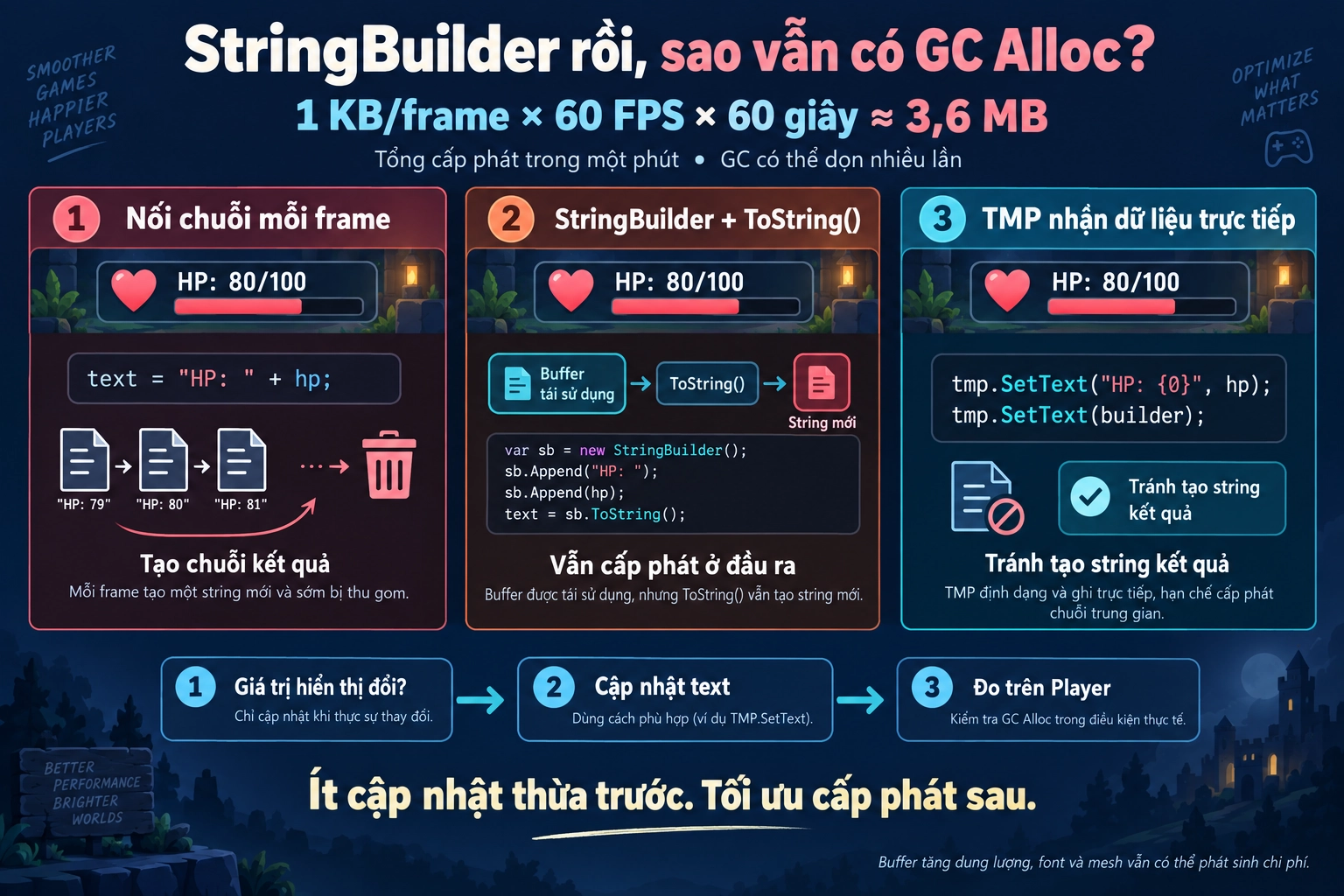 A familiar line in
 Update():
hpText.text = "HP: " + currentHp + "/" + maxHp;
The data doesn’t change, but the string is rebuilt every frame.
According to Unity’s example, 1 KB allocating every frame at 60 FPS is equivalent to about 3.6 MB per minute. This is the total amount allocated, not GC wait a full minute before cleaning up. Doing it continuously still creates extra work for the garbage collector. Unity Manual.
So if we switch to StringBuilder is that enough?
StringBuilder reduces garbage, but doesn’t necessarily eliminate it
string is immutable: you can’t modify the contents of a string after it has been created. When combining changing content, you usually have to create a new result string.
StringBuilder allows content to be built in a reusable buffer. But this still has a problem:
// _builder được tạo một lần và dùng lại.
_builder.Clear();
_builder.Append("HP: ").Append(currentHp);

hpText.text = _builder.ToString();
For non-empty content, ToString() it still creates the result string. The builder helps reduce intermediate strings when concatenating multiple parts, but it does not eliminate output allocation. Creating a new builder each time also adds extra overhead. Microsoft — StringBuilder.
Also, don’t confuse string creation with boxing. Calling ToString() directly on a variable int does not mean boxing; boxing is converting a value to object or the corresponding interface. Microsoft — Boxing.
With TextMeshProgo straight to the data that needs to be displayed
For HP or a simple timer:
hpText.SetText("HP: {0} / {1}", currentHp, maxHp);
Compared with:
hpText.SetText($"HP: {currentHp} / {maxHp}");
The second line has already built the string before calling SetTextso just renaming the function does not solve that allocation point.
TMP also accepts StringBuilder:
hpText.SetText(_builder); // Không cần _builder.ToString()
These overloads help avoid creating an output string. Note that TMP’s numeric formatting overloads 3.0 take float; large integers need accuracy checks, and they should not be used mechanically for currency or very large scores. TMP — SetText.
The first optimization: don’t update what hasn’t changed
A smoothly tweening health bar does not mean the HP text has to change every frame.
- The bar can keep running continuously to create motion.
- The HP text only updates when the displayed number changes.
- A timer that displays whole seconds only needs to change when it moves to a new second.
- A timer that displays fractional seconds needs to update more frequently.
You can call the update function from a data-change event, or cache the latest displayed value and skip it if it’s the same.
Even if the string-processing path doesn’t generate garbage, updating text can still be costly CPU for layout and mesh. Zero-Alloc does not mean it is free.
When do you need another solution?
Small numbers with a fixed range such as 0–100: you can prebuild a string table and reuse it. The trade-off is longer-lived memory; concatenating additional "HP: " each time still creates a new string.
Combat logs need to combine many components: consider ZString and TMP integration to pass the buffer directly. But if you still end up calling ToString()you still have an output string. A builder that uses a buffer pool also needs to be Dispose properly. Cysharp — ZString.
I would proceed in this order: remove redundant updates → choose API appropriate → measure on the Player after initialization has stabilized. Buffer growth, fonts, and meshes can still allocate; don’t conclude the entire UI “Zero-Alloc” from just one line SetText.
A few lines of text do not automatically hurt performance. But rebuilding them thousands of times when the content does not change is truly wasteful.