Serialization

Minh Khoa
Author
🧩 1️⃣ Brief definition
Serialization is the process of converting an object (object) in a program
→ into data that can be stored or transmitted (string, file, byte, JSON, v.v.)
And vice versa, Deserialization is the process of converting that data back into an object.
💬 Simple wording:
Serialization = “Package an object into data that can be saved or sent.”
Deserialization = “Unpack that data back into an object for reuse.”
🧱 2️⃣ Real-world example
- Serialization is like taking a snapshot of a game character → saving it to a file
.save. - Deserialization is when the game loads that file again → the character appears exactly as before (level, item, HP...).
🧠 3️⃣ In programming, why do we need serialization?
Situation Purpose 💾 Store data (Save/Load) Write object to a file JSON, Binary, XML, v.v. 🌐 Transmit data over the network Send object from client → server (or vice versa). ☁️ API / Database / Cloud Convert object into JSON to REST API process. 🧩 Unity Editor Unity serializes data to display & save in the scene. 🧠 Cache or config file Temporarily store configuration or gameplay data.
⚙️ 4️⃣ How it works
Example with C#:
[System.Serializable]
public class PlayerData {
    public string name;
    public int level;
    public float hp;
}
➕ Serialize (Save as JSON)
PlayerData player = new PlayerData { name = "Na", level = 5, hp = 99.5f };
string json = JsonUtility.ToJson(player);
Debug.Log(json);
Result:
{"name":"Na","level":5,"hp":99.5}
🔄 Deserialize (Read the object again)
PlayerData loaded = JsonUtility.FromJson<PlayerData>(json);
Debug.Log(loaded.name); // "Na"
➡️ From JSON → back into an object PlayerData that can be used in code.
🧰 5️⃣ Serialization in Unity
Unity serializes all data in a scene, prefab, or ScriptableObject to:
- Save values in Editor.
- Display in Inspector.
- Save to a file
.unity,.prefab,.assetwhen you click Save.
🧩 Unity can only serialize:
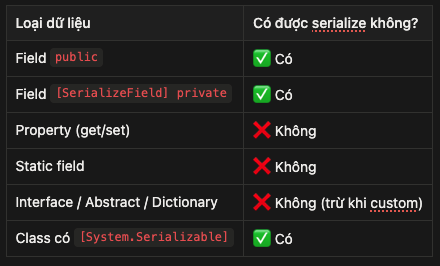 ---
---
🔧 Unity example
[System.Serializable]
public class InventoryItem {
    public string itemName;
    public int amount;
}

public class PlayerInventory : MonoBehaviour {
    [SerializeField] private List<InventoryItem> items; // hiển thị & lưu trong Inspector
}
→ Unity will serialize this list into the scene or prefab file,
so when you reload the scene, the data stays exactly the same.
🧠 6️⃣ How many common serialization types are there?
Type Description Example JSON Serialization Text form, easy to read, most common {"name":"Na","hp":100} Binary Serialization Faster, smaller, harder to read Used for files .save or .dat XML Serialization Text form with tags <Player><Name>Na</Name></Player> Custom Serialization Self-defined read/write logic Used in Unity Editor Tools
💾 7️⃣ Real example – Game Save System (Unity)
Save game:
void SaveGame(PlayerData data) {
    string json = JsonUtility.ToJson(data);
    File.WriteAllText(Application.persistentDataPath + "/save.json", json);
}
Load game:
PlayerData LoadGame() {
    string json = File.ReadAllText(Application.persistentDataPath + "/save.json");
    return JsonUtility.FromJson<PlayerData>(json);
}
➡️ Automatically save all player information → read it back when the game starts.
🧩 8️⃣ Benefits & Risks
✅ Advantages:
- Easy to save / transmit objects.
- Supports many common formats (JSONbinary, XML).
- Easy to debug & read files JSON.
- Very important in network, save, or editor tools.
❌ Disadvantages:
- Not every type can be serialized (e.g.: delegate, event, complex object).
- Data is easy to modify (if JSON → it can be cheated).
- Binary is difficult to be compatible across different versions.
- Security is needed when used online (hash, encrypt).