The Complete Observer Pattern in Unity (Event-Driven Architecture)

Minh Khoa
Author
 ---
---
📌 INTRODUCTION — THE REAL-WORLD PROBLEM
Imagine in the game Sushi Bar Idle:
- When customers pay → UI the money must update → Analytics must log → Tutorial must check → Notification badge must turn off
- When upgrade station → UI must refresh → Sound must play → Save must be written → Particle Effect must explode
If you code it directly:
// ❌ Cách tệ — Station biết quá nhiều về người khác
public class Station : MonoBehaviour
{
    public void Upgrade()
    {
        _level++;
        UIManager.Instance.RefreshStationUI(this);   // coupled!
        AudioManager.Instance.PlaySFX("upgrade");    // coupled!
        SaveSystem.Instance.Save();                  // coupled!
        ParticleManager.Instance.PlayUpgrade(pos);   // coupled!
        AnalyticsManager.Instance.LogUpgrade(_id);   // coupled!
    }
}
Station should not know about UIManager, AudioManager, SaveSystem... This is why Observer Pattern was born — to decouple the event sender from the receiver.
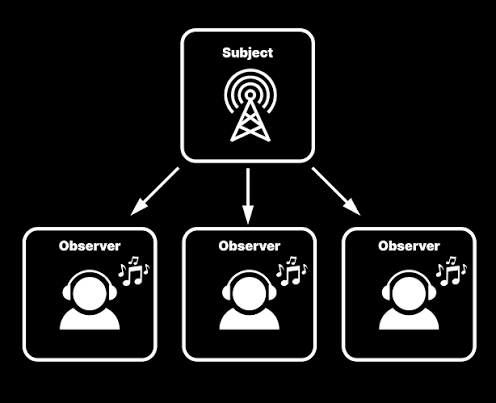
Observer Pattern = Publisher does not know who the Subscriber is. Subscriber does not know who the Publisher is. Both only communicate through an intermediary "channel".
🧠 WHAT IS THE OBSERVER PATTERN?
Simple definition
Observer Pattern is a design pattern in the Behavioral (behavioral)group. The core idea:
- There is a Subject (sender / Publisher) — holding a list of those who are interested.
- There are many Observer (listeners / Subscribers) — register to listen and react when there is an event.
- When the Subject changes state → automatically notify all Observers.
Everyday example
You subscribe to a channel YouTube. When YouTuber (Subject) posts a new video → all subscribers (Observer) receive a notification. YouTuber does not need to know who you are, and you also do not need to know who else is subscribed.
How it works
  Subject (Publisher)           Observer (Subscriber)
  ┌──────────────────┐          ┌────────────────┐
  │  - observers[]   │          │  + Update()    │
  │  + Subscribe()   │◄─────────│                │
  │  + Unsubscribe() │          └────────────────┘
  │  + Notify()      │          ┌────────────────┐
  │                  │◄─────────│  + Update()    │
  └──────────────────┘          └────────────────┘

  Khi Subject gọi Notify() → tất cả Observer.Update() được gọi
Why do we need the Observer Pattern?
| Without Observer | With Observer |
|---|---|
Station must import UIManager, AudioManager, SaveSystem... | Station just has to "shout": "I have upgraded!" |
| Adding a new system = must modify Station | Adding a new system = just register to listen |
| Tight Coupling — hard to test, hard to maintain | Loose Coupling — easy to test, easy to extend |
| Delete AudioManager → Station gets a compile error | Delete AudioManager → Station is not affected |
🔷 PART 1 — C# DELEGATE & EVENT (THE CORE FOUNDATION)
What is a delegate?
A delegate is a reference type that points to a method. Like a contract: "I need a function with this shape."
// Khai báo delegate — tấm hợp đồng: "cần 1 hàm nhận int, trả void"
public delegate void OnMoneyChanged(int newAmount);

// Gán một hàm vào delegate
OnMoneyChanged handler = (amount) => Debug.Log($"Tiền mới: {amount}");

// Gọi
handler.Invoke(500);  // Output: "Tiền mới: 500"
Action, Func — built-in delegates of C#
Instead of declaring a delegate every time, C# has already provided:
// Action — hàm KHÔNG trả về giá trị (void)
Action onPlayerDied;               // không tham số
Action<int> onMoneyChanged;        // 1 tham số int
Action<string, int> onItemCollected; // 2 tham số

// Func — hàm CÓ trả về giá trị (kiểu cuối cùng là return type)
Func<bool> canAfford;              // () => bool
Func<int, float> calcDamage;       // (int) => float
💡 Memory trick:
Action= do something (void).Func= calculate something (has return).
Event keyword — Protecting delegates
event is a protective layer wrapped around a delegate, preventing outside code from:
- ❌ Not allowed to call directly (
.Invoke()) — only the owning class is allowed to call it - ❌ Not allowed to overwrite with
=— used only+=and-=
public class CurrencySystem : MonoBehaviour
{
    // ✅ Có "event" → an toàn, bên ngoài chỉ += / -= được thôi
    public event Action<int> OnMoneyChanged;

    private int _money;

    public void AddMoney(int amount)
    {
        _money += amount;
        OnMoneyChanged?.Invoke(_money);  // ?. để tránh null nếu chưa ai đăng ký
    }
}

public class MoneyUI : MonoBehaviour
{
    [SerializeField] private CurrencySystem _currency;

    private void OnEnable()
    {
        _currency.OnMoneyChanged += UpdateDisplay;   // Đăng ký
    }

    private void OnDisable()
    {
        _currency.OnMoneyChanged -= UpdateDisplay;   // HỦY đăng ký — CỰC KỲ QUAN TRỌNG!
    }

    private void UpdateDisplay(int amount)
    {
        _label.text = $"${amount}";
    }
}
Passing complex data — use struct
When an event needs to carry multiple pieces of information:
// Đóng gói dữ liệu vào struct
public struct UpgradeInfo
{
    public int StationId;
    public int NewLevel;
    public int Cost;
}

public class Station : MonoBehaviour
{
    public event Action<UpgradeInfo> OnUpgraded;

    public void Upgrade()
    {
        _level++;

        // Bắn event kèm dữ liệu — không cần biết ai sẽ nhận
        OnUpgraded?.Invoke(new UpgradeInfo
        {
            StationId = _id,
            NewLevel = _level,
            Cost = GetUpgradeCost()
        });
    }
}
⚠️ Memory Leak — The most common trap
// ❌ SAI: Đăng ký mà không bao giờ hủy
public class BadUI : MonoBehaviour
{
    void Start()
    {
        station.OnUpgraded += ShowEffect;
        // Object bị Destroy nhưng delegate vẫn giữ reference → Memory Leak!
    }
}

// ✅ ĐÚNG: OnEnable đăng ký, OnDisable hủy
public class GoodUI : MonoBehaviour
{
    void OnEnable()  => station.OnUpgraded += ShowEffect;
    void OnDisable() => station.OnUpgraded -= ShowEffect;
}
🔴 Golden rule:
OnEnableregister →OnDisableunregister. No exceptions.
🔶 PART 2 — UNITY EVENT
UnityEvent what is it?
UnityEvent is Unity's event system that allows drag-and-drop connections in the Inspector. Designers don't need to write code — they just need to drag the component and select the function.
using UnityEngine.Events;

public class Door : MonoBehaviour
{
    // Hiện trong Inspector → kéo thả object + chọn hàm
    public UnityEvent OnDoorOpened;
    public UnityEvent<int> OnDamageReceived;  // Có tham số

    public void Open()
    {
        // Mở cửa...
        OnDoorOpened?.Invoke();
    }
}
Custom UnityEvent (complex data types)
// Phải có [Serializable] để hiện trong Inspector
[System.Serializable]
public class CustomerEvent : UnityEvent<Customer> { }

public class CustomerManager : MonoBehaviour
{
    public CustomerEvent OnCustomerArrived;  // Kéo thả trong Inspector

    void SpawnCustomer()
    {
        var customer = CreateCustomer();
        OnCustomerArrived?.Invoke(customer);
    }
}
Pros & Cons UnityEvent
| Pros ✅ | Cons ❌ |
|---|---|
| Visual drag-and-drop in the Inspector | Slower C# event 3-5 every (time) |
| uses Reflection | Designers don't need to write code |
| Hard to debug — the connection is hidden in the scene file | Good for prototypes, level scripting |
| Renaming the function → loses the connection without an error scene/prefab | Can be saved together with MonoBehaviour |
💡 Cannot be used outside of UI When to use it? Trigger/Collider Button click, Animation Event,
— places where the Designer needs to intervene.
🟣 PART 3 — SCRIPTABLE OBJECT EVENT SYSTEM
An architecture introduced by Ryan Hipple at Unite Austin 2017 — extremely elegant.
Problem to solve# C UnityEvent event and both require the Publisher and Subscriber tokeep references to each other
- . Difficult when: Publisher and Subscriber are in
- different scenes Object is Instantiate from a Prefab
- at runtime Want to test the event
without running the game
Solution: The Event is an Asset file ScriptableObject Idea: Create a file
that represents the event. The Publisher "shouts into this file", the Subscriber "listens to this file". The two do not know that the other exists. GameEvent (Step 1 — Create):
[CreateAssetMenu(menuName = "Events/Game Event")]
public class GameEvent : ScriptableObject
{
    private readonly List<GameEventListener> _listeners = new();

    // Publisher gọi hàm này
    public void Raise()
    {
        // Duyệt ngược để tránh lỗi khi listener tự hủy đăng ký
        for (int i = _listeners.Count - 1; i >= 0; i--)
            _listeners[i].OnEventRaised();
    }

    public void Register(GameEventListener listener) => _listeners.Add(listener);
    public void Unregister(GameEventListener listener) => _listeners.Remove(listener);
}
the asset file GameEventListener (Step 2 — Create GameObject):
public class GameEventListener : MonoBehaviour
{
    [SerializeField] private GameEvent _event;       // Kéo thả file event vào
    [SerializeField] private UnityEvent _response;   // Kéo thả hàm phản hồi

    void OnEnable()  => _event.Register(this);
    void OnDisable() => _event.Unregister(this);

    public void OnEventRaised() => _response?.Invoke();
}
attach it to
// Station.cs — Publisher
public class Station : MonoBehaviour
{
    [SerializeField] private GameEvent _onUpgraded;  // Kéo file asset vào

    public void Upgrade()
    {
        _level++;
        _onUpgraded.Raise();  // Hét lên: "Tôi upgrade rồi!"
    }
}

// AudioManager.cs — Subscriber (đăng ký qua code hoặc qua Listener component)
public class AudioManager : MonoBehaviour
{
    // Cách 1: Gắn GameEventListener component, kéo thả trong Inspector
    // Cách 2: Đăng ký bằng code (xem phần Generic bên dưới)
}
Step 3 — Use: (Version with parameters)
// Base class cho event có dữ liệu
public abstract class GameEvent<T> : ScriptableObject
{
    private readonly List<Action<T>> _listeners = new();

    public void Raise(T value)
    {
        foreach (var listener in _listeners)
            listener?.Invoke(value);
    }

    public void Register(Action<T> listener) => _listeners.Add(listener);
    public void Unregister(Action<T> listener) => _listeners.Remove(listener);
}

// Tạo event cụ thể
[CreateAssetMenu(menuName = "Events/Int Event")]
public class IntEvent : GameEvent<int> { }
Generic
- ✅ SO Event advantages Zero coupling
- ✅ — Publisher and Subscriber do not reference each other Easy to test() — Right-click the asset → call Raise
- ✅ directly in the Editor Works across scenes
- ✅ Designer-friendly — The asset exists in the Project, not in any scene
— Drag-and-drop, no code required (🟠 PART 4 — EVENT BUS)
EventBus GLOBAL EVENT SYSTEM
EventBus what is it? is aglobal message dispatch center (. Anyone can send) Publish (or receive) Subscribe
without needing a reference to any object.
// EventBus dùng generic — mỗi kiểu event có "kênh" riêng
public static class EventBus<T> where T : struct
{
    private static readonly List<Action<T>> _listeners = new();

    public static void Register(Action<T> listener) => _listeners.Add(listener);
    public static void Deregister(Action<T> listener) => _listeners.Remove(listener);

    public static void Raise(T eventData)
    {
        // Duyệt ngược phòng trường hợp listener tự hủy đăng ký
        for (int i = _listeners.Count - 1; i >= 0; i--)
            _listeners[i]?.Invoke(eventData);
    }
}
Simple implementation using
// 1. Định nghĩa event bằng struct (nhẹ, không GC)
public struct PlayerDiedEvent
{
    public Vector3 DeathPosition;
    public int Score;
}

// 2. Publisher — bắn event
public class Player : MonoBehaviour
{
    void Die()
    {
        EventBus<PlayerDiedEvent>.Raise(new PlayerDiedEvent
        {
            DeathPosition = transform.position,
            Score = _currentScore
        });
    }
}

// 3. Subscriber — nhận event
public class ScoreUI : MonoBehaviour
{
    void OnEnable()
    {
        EventBus<PlayerDiedEvent>.Register(OnPlayerDied);
    }

    void OnDisable()
    {
        EventBus<PlayerDiedEvent>.Deregister(OnPlayerDied);
    }

    void OnPlayerDied(PlayerDiedEvent e)
    {
        Debug.Log($"Game Over! Điểm: {e.Score}");
    }
}
⚠️ Be careful with EventBus
- EventBus using
static→ listener lists that do not reset automatically when changing scenes - If you forget
Deregister→ memory leak, events are triggered multiple times - Overuse EventBus → hard to debug because you don’t know who is listening ("God Bus")
💡 Tip: Only use EventBus for game-wide (GameOver, LevelComplete)level events# . For internal module events, use C
events instead. UNIRX (🔵 PART 5 —) REACTIVE PROGRAMMING
UniRx — ADVANCED UniRx is the Reactive Extensions library for Unity. Instead of "fire event → catch event," it lets you describe data flows
ReactiveProperty and compose complex events.
using UniRx;

public class PlayerStats : MonoBehaviour
{
    // Mỗi khi gán giá trị mới → tự động thông báo cho ai đang Subscribe
    public ReactiveProperty<int> Money = new(0);
    public ReactiveProperty<int> Health = new(100);
}

public class GameUI : MonoBehaviour
{
    [SerializeField] private PlayerStats _stats;

    void Start()
    {
        // Subscribe → mỗi khi Money thay đổi, cập nhật UI
        _stats.Money
            .Subscribe(amount => _moneyLabel.text = $"${amount}")
            .AddTo(this);  // AddTo(this) → tự hủy khi object Destroy

        // Chỉ cảnh báo khi máu dưới 20
        _stats.Health
            .Where(hp => hp <= 20)
            .Subscribe(_ => ShowLowHealthWarning())
            .AddTo(this);
    }
}
— Variables automatically fire events when they change
// Debounce Search — chỉ tìm kiếm sau khi người dùng ngừng gõ 0.5 giây
_searchInput.onValueChanged.AsObservable()
    .Debounce(TimeSpan.FromSeconds(0.5f))
    .Subscribe(text => PerformSearch(text))
    .AddTo(this);
The real power: Compose Events UniRx?
- When to use ✅ Logic depends on (time)
- debounce, throttle, delay, timeout ✅ Need to combine (multiple conditions)
- ✅ UI only attack when there is enough mana AND cooldown is finished AND not stunned
- ❌ complex data binding Don’t use it# for simple tasks that C over-engineering
events can handle — ANTI-PATTERNS ⚠️ PART 6 —
& COMMON ERRORS (1. Forgetting to unsubscribe)
// ❌ Đăng ký trong Start() mà không hủy trong OnDisable()
// → Reload scene 5 lần = event gọi 5 lần!

// ✅ Luôn đi theo cặp:
void OnEnable()  => SomeEvent.OnFired += Handle;
void OnDisable() => SomeEvent.OnFired -= Handle;
Memory Leak
// ❌ Subscriber tự Unregister trong lúc event đang Raise → Crash!
foreach (var listener in _listeners)  // InvalidOperationException!
    listener.OnEventRaised();         // Listener gọi Unregister() bên trong

// ✅ Duyệt ngược → xóa phần tử cuối không ảnh hưởng phần tử trước
for (int i = _listeners.Count - 1; i >= 0; i--)
    _listeners[i].OnEventRaised();
2. Modifying the listener list while iterating
// ❌ Static event + MonoBehaviour không hủy đăng ký
public static event Action OnGameOver;
// Reload scene → object mới đăng ký THÊM → event gọi trùng!

// ✅ Luôn -= trong OnDisable
3. Static events causing ghost listeners across scenes
// ❌ Mỗi stat một event riêng
public event Action<float> OnHealthChanged;
public event Action<float> OnManaChanged;
public event Action<float> OnStaminaChanged;

// ✅ Gom lại thành 1 event
public event Action<PlayerStats> OnStatsChanged;
4. Event Spaghetti — too many small, scattered events
// ❌ Giả định AudioManager nhận event TRƯỚC SaveSystem
// Observer Pattern KHÔNG đảm bảo thứ tự!

// ✅ Nếu cần thứ tự → tách thành nhiều event có phase:
//   Phase 1: OnBeforeGameOver  (cleanup)
//   Phase 2: OnGameOver        (main logic)
//   Phase 3: OnAfterGameOver   (analytics, save)
5. Dependence on subscriber order
| ⚖️ PART 7 — SUMMARY COMPARISON TABLE | Criteria# C | UnityEvent | Event | EventBus | UniRx |
|---|---|---|---|---|---|
| SO Event | Speed | ⚡ Fastest (🐢 Slow) | Reflection | ⚡ Fast | ⚡ Fast |
| 🔄 Average | Coupling | Needs reference | Drag and drop in Inspector | Zero coupling | Zero coupling |
| Needs reference or global | ❌ | ❌ | ✅ | ✅ | Across scenes |
| Designer-friendly | ❌ | ✅✅ | ✅ | ❌ | ❌ |
| Depends on usage | ✅ | ❌ (Easy to debug) | ✅ | ❌ (hidden in the scene) | ❌ (don’t know who listens) |
| Type-safe | ✅✅ | ❌ (complex stream) | ✅ | ✅ | ✅ |
| runtime error | Suitable for | UIInternal module communication | , Prototype scene/Prefab | Across game-wide | Broadcast |
Complex time-based logic
Giao tiếp trong một module         → C# delegate / event
Designer cần kéo thả               → UnityEvent
Giao tiếp xuyên scene / Prefab     → ScriptableObject Event
Broadcast toàn game                → EventBus
Logic phức tạp theo thời gian      → UniRx ReactiveProperty
🎯 CONCLUSION — USE THE RIGHT KIND OF BULLET FOR THE RIGHT GUN In a real project, you will usemultiple approaches at the same time , each in the right place. There is no tool that is "the best" — only the tool most suitable
🔴 for the context . The most important thing at the end: No matter which method you use, ALWAYS UNSUBSCRIBE. This is the number one cause of dark bugs in Unity that no one wants to debug.
Reference: Unite Austin 2017 — "Game Architecture with Scriptable Objects" (Ryan Hipple), UniRx Documentation, C# in Depth (Jon Skeet)